Diese Seite ist eine Kopie der Lenovo-Seite, Stand: 10.04.2021
Knowledge Base & Guides
Display and Video Output Configurations - Docking Stations
The following describes display and video output configurations supported by ThinkPad systems in docking and non-docking configurations.
- Docking Configurations:
- ThinkPad Thunderbolt 3 Workstation Dock - 170W/230W (40AN)
- ThinkPad Thunderbolt 3 Workstation Dock Gen 2 (40AN)
- ThinkPad Thunderbolt 3 Dock Gen 2 (40AN)
- Lenovo Thunderbolt 3 Essential Dock (40AV)
- ThinkPad Basic Docking Station (40AG)
- ThinkPad Pro Docking Station (40AH)
- ThinkPad Ultra Docking Station (40AJ)
- ThinkPad Hybrid USB-C and USB-A Dock (40AF)
- ThinkPad Thunderbolt 3 Dock (40AC)
- ThinkPad Workstation Dock 230W (40A5)
- ThinkPad OneLink+ Dock (40A4)
- ThinkPad Basic Dock (40A0)
- ThinkPad Pro Dock (40A1)
- ThinkPad Ultra Dock (40A2)
- ThinkPad USB-C Dock (40A9)
- ThinkPad USB-C Dock Gen 2 (40AS)
- Lenovo USB-C Mini Dock (40AU)
- Non-Docking Configurations:
| ThinkPad Thunderbolt 3 Workstation Dock - 170W/230W (40AN) |
|---|


| Display Configuration | Integrated ThinkPad display | DisplayPort 1 | DisplayPort 2 / HDMI 2 | HDMI 1 | Thunderboldt downstream | Notes |
| One Display | - | 3840*2160@60Hz | ||||
| - | DisplayPort or HDMI: 3840*2160@60Hz | |||||
| - | 3840*2160@60Hz | |||||
| - | 3840x2160@60hz or 5K@60hz | |||||
| Two Displays | On | 3840*2160@60Hz | ||||
| On | DisplayPort or HDMI: 3840*2160@60Hz | |||||
| On | 3840*2160@60Hz | |||||
| On | 3840x2160@60hz | |||||
| - | 3840*2160@60Hz | 3840*2160@60Hz | ||||
| - | 3840*2160@60Hz | 3840*2160@60Hz | ||||
| - | 3840*2160@60hz | 3840*2160@60Hz | ||||
| - | 3840*2160@60Hz | 3840*2160@60Hz | ||||
| Three Displays | - | One at: 3840*2160@60hz and one at: 2560 × 1440@60Hz | 3840*2160@60hz | |||
| - | 3840*2160@60Hz | 3840*2160@30Hz | 3840*2160@30Hz | |||
| On | Two at: 3840*2160@60Hz | |||||
| On | 3840x2160@60Hz | 3840x2160@60Hz | ||||
| Four Displays | - | One at: 3840*2160@60Hz and two at: 1920*1080@60Hz | 3840*2160@60hz | for Nvidia dGFX module only | ||
| Or | ||||||
| Three at: 2560*1440@60Hz | ||||||
| On | One at: 3840*2160@60Hz and two at: 3840*2160@30Hz | for Nvidia dGFX module only | ||||
| On | Two at: 3840*2160@30Hz | 3840*2160@60hz | for Nvidia dGFX module only | |||
| ThinkPad Thunderbolt 3 Workstation Dock Gen 2 (40AN) |
|---|

Thunderbolt 3 Workstation Dock Gen2 can support DisplayPort 1.4 resolutions,which supports on Thinkpad P52/P72/P1/P1 Gen2/P1 Gen3/X1 Extreme Gen2/P73/P53/P15 Gen1/P17 Gen1.
The table below has the video resolutions for Thunderbolt 3 Workstation Dock Gen2 with Thunderbolt 3 host Thinkpad system 1(support DP1.4):
|
Display Config |
NB Built-in LCD |
DP1 |
DP2/HDMI 2 |
HDMI 1 |
TBT downstream |
Remark |
|
1 display |
- |
3840*2160@60Hz or 5k@60hz |
|
|
|
|
|
- |
|
DP2: 3840*2160@60Hz or HDMI2 3840*2160@60hz |
|
|
|
|
|
- |
|
|
3840*2160@60Hz |
|
|
|
|
- |
|
|
|
3840x2160@60hz or 5K@60hz |
|
|
|
2 displays |
ON |
3840*2160@60Hz or 5k@60hz |
|
|
|
|
|
ON |
|
DP2: 3840*2160@60Hz or HDMI: 3840*2160@60hz |
|
|
|
|
|
ON |
|
|
3840*2160@60Hz |
|
|
|
|
ON |
|
|
|
3840x2160@60hz or 5K@60hz |
|
|
|
- |
3840*2160@60Hz |
3840*2160@60Hz |
|
|
|
|
|
- |
|
3840*2160@60Hz |
3840*2160@60Hz |
|
|
|
|
- |
3840*2160@60hz |
|
|
|
||
|
- |
|
|||||
|
3 displays |
- |
One at: 3840*2160@60hz and one at: 2560 × 1440@60Hz |
3840*2160@60hz |
|
||
|
- |
3840*2160@60Hz |
3840*2160@30Hz |
3840*2160@30Hz |
|
|
|
|
On |
Two at: 3840*2160@60Hz |
|
|
|||
|
On |
3840x2160@60Hz |
3840x2160@60Hz |
|
|||
|
4 displays |
- |
One at: 3840*2160@60Hz and two at: 1920*1080@60Hz |
3840*2160@60hz |
for Nvidia dGFX module only |
||
|
- |
Or |
|||||
|
|
Three at: 2560*1440@60Hz |
|||||
|
On |
One at: 3840*2160@60Hz and two at: 3840*2160@30Hz |
|
for Nvidia dGFX module only |
|||
|
On |
Two at: 3840*2160@30Hz |
3840*2160@60hz |
for Nvidia dGFX module only |
|||
The table below has the video resolutions for Thunderbolt 3 Workstation Dock Gen2 with P14s AMD G1(#20Y1,20Y2)(support DP1.4):
|
TR dock |
LCD |
DP1 |
DP2&HDMI2 |
HDMI1 |
Remark |
|
1 Display |
off |
3840*2160@60HZ |
|
|
|
|
off |
|
3840*2160@60HZ |
|
|
|
|
off |
|
|
3840*2160@60HZ |
|
|
|
2 Displays |
on |
3840*2160@60HZ |
|
|
|
|
on |
|
3840*2160@60HZ |
|
|
|
|
on |
|
|
3840*2160@60HZ |
|
|
|
off |
3840*2160@60HZ |
3840*2160@60HZ |
|
|
|
|
off |
|
3840*2160@60HZ |
3840*2160@60HZ |
|
|
|
off |
3840*2160@60HZ |
|
3840*2160@60HZ |
|
|
|
3 Displays |
on |
3840*2160@60HZ |
3840*2160@60HZ |
|
|
|
on |
|
3840*2160@60HZ |
3840*2160@60HZ |
|
|
|
on |
3840*2160@60HZ |
|
3840*2160@60HZ |
|
|
|
off |
3840*2160@60HZ |
3840*2160@60HZ |
3840*2160@30HZ |
|
| TR dock | LCD | DP1 | DP2&HDMI2 | HDMI1 | TBT downstream | Remark |
| 1 Display | off | 3840*2160@60HZ | ||||
| off | 3840*2160@60HZ | |||||
| off | 3840*2160@60HZ | |||||
| 3840*2160@60HZ | ||||||
| 2 Displays | on | 3840*2160@60HZ | ||||
| on | 3840*2160@60HZ | |||||
| on | 3840*2160@60HZ | |||||
| off | 3840*2160@60HZ | 3840*2160@60HZ | ||||
| off | 3840*2160@60HZ | 3840*2160@60HZ | ||||
| off | 3840*2160@60HZ | 3840*2160@60HZ | ||||
| 3840*2160@60HZ | 3840*2160@60HZ | |||||
| 3 Displays | on | 3840*2160@60HZ | 3840*2160@60HZ | |||
| on | 3840*2160@60HZ | 3840*2160@60HZ | ||||
| on | 3840*2160@60HZ | 3840*2160@60HZ | ||||
| off | 3840*2160@60HZ | 3840*2160@60HZ | 3840*2160@60HZ | Need GPU driver to support 3x 4K60Hz, or 1display reduce to4K30Hz. | ||
| Off | 3840*2160@60HZ | 3840*2160@60HZ | ||||
| 4 Displays | on | 3840*2160@60HZ | 3840*2160@60HZ | 3840*2160@60HZ | ||
| Off | 3840*2160@60HZ | 3840*2160@30HZ | 3840*2160@30HZ | 3840*2160@60HZ | ||
Thunderbolt 3 Workstation Dock Gen2 can support DisplayPort 1.2
resolutions ,which supports on ThinkPad P15v Gen1/ P14s Gen1/P15s Gen1
The table below has the video resolutions for Thunderbolt 3 Workstation
Dock Gen2 with Thunderbolt 3 host ThinkPad system 1(support DP1.2):
|
Display Config |
NB Built-in LCD |
DP1 |
DP2/HDMI 2 |
HDMI 1 |
TBT downstream |
Remark |
|
1 display |
- |
3840*2160@60Hz or 5k@60hz |
|
|
|
|
|
- |
|
DP2: 3840*2160@60Hz or HDMI2 3840*2160@60hz |
|
|
|
|
|
- |
|
|
3840*2160@60Hz |
|
|
|
|
- |
|
|
|
3840x2160@60hz or 5K@60hz |
|
|
|
2 displays |
ON |
3840*2160@60Hz or 5k@60hz |
|
|
|
|
|
ON |
|
DP2: 3840*2160@60Hz or HDMI2 3840*2160@60hz |
|
|
|
|
|
ON |
|
|
3840*2160@60Hz |
|
|
|
|
ON |
|
|
|
3840x2160@60hz or 5K@60hz |
|
|
|
- |
3840*2160@30Hz |
3840*2160@30Hz |
|
|
|
|
|
- |
|
3840*2160@30Hz |
3840*2160@30Hz |
|
|
|
|
- |
3840*2160@30hz |
|
3840*2160@30Hz |
|
|
|
|
3 displays |
- |
2560*1600@60hz |
1920*1080@60hz |
1920*1080@60hz |
|
|
|
- |
3840*2160@30Hz |
1920*1080@60hz |
1920*1080@60hz |
|
|
|
|
ON |
3840*2160@30Hz |
3840*2160@30Hz |
|
|
|
|
|
ON |
|
3840*2160@30Hz |
3840*2160@30Hz |
|
|
|
|
ON |
3840*2160@30Hz |
|
3840*2160@30Hz |
|
|
The table below has the video resolutions for Thunderbolt 3 Workstation Dock Gen2 with P1 Gen 3 (#20TJ) (support DP1.2):
|
Display Config |
NB Built-in LCD |
DP1 |
DP2/HDMI 2 |
HDMI 1 |
TBT downstream |
Remark |
|
1 display |
- |
3840*2160@60Hz or 5k@60hz |
|
|
|
|
|
- |
|
DP2: 3840*2160@60Hz or HDMI2 3840*2160@60hz |
|
|
|
|
|
- |
|
|
3840*2160@60Hz |
|
|
|
|
- |
|
|
|
3840x2160@60hz or 5K@60hz |
|
|
|
2 displays |
ON |
3840*2160@60Hz or 5k@60hz |
|
|
|
|
|
ON |
|
DP2: 3840*2160@60Hz or HDMI2 3840*2160@60hz |
|
|
|
|
|
ON |
|
|
3840*2160@60Hz |
|
|
|
|
ON |
|
|
|
3840x2160@60hz or 5K@60hz |
|
|
|
- |
3840*2160@30Hz |
3840*2160@30Hz |
|
|
|
|
|
- |
|
3840*2160@30Hz |
3840*2160@30Hz |
|
|
|
|
- |
3840*2160@30hz |
|
3840*2160@30Hz |
|
|
|
|
- |
3840*2160@30Hz |
3840*2160@30Hz |
|
|||
|
3 displays |
|
|
3840*2160@30hz |
3840*2160@30hz |
3840*2160@60hz |
|
|
|
3840*2160@30hz |
3840*2160@30hz |
|
3840*2160@60hz |
|
|
|
- |
2560*1600@60hz |
1920*1080@60hz |
1920*1080@60hz |
|
|
|
|
- |
3840*2160@30Hz |
1920*1080@60hz |
1920*1080@60hz |
|
|
|
|
ON |
3840*2160@30Hz |
3840*2160@30Hz |
|
|
|
|
|
ON |
|
3840*2160@30Hz |
3840*2160@30Hz |
|
|
|
|
ON |
3840*2160@30Hz |
|
3840*2160@30Hz |
|
|
|
| ThinkPad Thunderbolt 3 Dock Gen 2 (40AN) |
|---|


Thunderbolt 3 Port with Thunderbolt 3 Dock cable (03X7539 or 5C10V25714):

Video Resolutions on ThinkPad DisplayPort 1.2 Thunderbolt Systems
Thunderbolt 3 Dock Gen2 can support DisplayPort 1.4 resolutions. However, video resolution is dependent on the ThinkPad system.
The table below has the video resolutions for Thunderbolt 3 Dock Gen2 with Thunderbolt 3 host thinkpad system 2 (support DP1.2):
| Display Config | NB Built-in LCD | DP1 | DP2/HDMI 2 | HDMI 1 | TBT downstream | Remark |
| 1 display | - | 3840*2160@60Hz | ||||
| - | DP2: 3840*2160@60Hz or HDMI2: 3840*2160@60hz | |||||
| - | 3840*2160@60Hz | |||||
| - | 3840x2160@60hz or 5K | |||||
| 2 displays | ON | 3840*2160@60Hz | ||||
| ON | DP2: 3840*2160@60Hz or HDMI: 3840*2160@60hz | |||||
| ON | 3840*2160@60Hz | |||||
| ON | 3840x2160@60hz | |||||
| - | 3840*2160@30Hz | 3840*2160@30Hz | ||||
| - | 3840*2160@30Hz | 3840*2160@30Hz | ||||
| - | 3840*2160@30hz | 3840*2160@30Hz | ||||
| - | 3840*2160@60Hz | 3840*2160@60Hz | Only able to be supported by X1 Carbon 5th Gen, 6th Gen, 7th Gen , 8th Gen and X1 Yoga 2nd Gen, 3rd Gen, 4th Gen, 5th Gen with Thunderbolt AR DisplayPort solution from system side | |||
| 3 displays | - | 3840*2160@30hz | 3840*2160@30Hz | 3840*2160@60hz | ||
| - | 3840*2160@30Hz | 3840*2160@30Hz | 3840*2160@60Hz | |||
| - | 2560*1600@60hz | 1920*1080@60hz | 1920*1080@60hz | |||
| - | 3840*2160@30Hz | 1920*1080@60Hz | 1920*1080@60Hz | |||
| ON | 3840*2160@30Hz | 3840*2160@30Hz | ||||
| ON | 3840*2160@30Hz | 3840x2160@30Hz | ||||
| ON | 3840*2160@30hz | 3840x2160@30Hz | ||||
Video Reslolution with USB-C Port with Thunderbolt 3 Dock cable (03X7539 or 5C10V25714):

Video Resolutions on ThinkPad DisplayPort 1.2 Thunderbolt Systems
Thunderbolt 3 Dock Gen2 can support DisplayPort1.4 resolution. However, video resolution is dependent on the ThinkPad system.
The table below has the video resolutions for Thunderbolt 3 Dock Gen2 with non-Thunderbolt host DP1.2 Thinkpad system :
- Up to 4k@30Hz max resolution support via single DisplayPort or HDMI port
- Dual 1080p digital displays via 2 DisplayPort or HDMI ports
| Display Config | NB Built-in LCD | DP1 | DP2/HDMI 2 | HDMI 1 | TBT downstream |
| 1 display | - | 3840*2160@30Hz | N/A | ||
| - | DP2: 3840*2160@30Hz | ||||
| or HDMI: 3840*2160@30HZ | |||||
| - | 3840*2160@30Hz | ||||
| - | |||||
| 2 displays | ON | 3840*2160@30Hz | |||
| ON | DP2: 3840*2160@30Hz | ||||
| or HDMI: 3840*2160@30hz | |||||
| ON | 3840*2160@30Hz | ||||
| - | 1920*1080@60Hz | 1920*1080@60Hz | |||
| - | 1920*1080@60Hz | 1920*1080@60Hz | |||
| - | 1920*1080@60Hz | 1920*1080@60Hz | |||
| 3 displays | ON | 1920*1080@60Hz | 1920*1080@60Hz | ||
| ON | 1920*1080@60Hz | 1920*1080@60Hz | |||
| ON | 1920*1080@60Hz | 1920*1080@60Hz |
Video Resolutions on ThinkPad DisplayPort 1.4 Thunderbolt Systems
Thunderbolt 3 Dock Gen2 can support DisplayPort1.4 resolution. However, video resolution is dependent on the ThinkPad system.
The table below has the video resolutions for Thunderbolt 3 Dock Gen2 with Thunderbolt host Thinkpad system 1(support DP1.4):
| Display Config | NB Built-in LCD | DP1 | DP2/HDMI 2 | HDMI 1 | TBT downstream | Remark |
| 1 display | - | 3840*2160@60Hz or 5k@60hz | ||||
| - | DP2: 3840*2160@60Hz or HDMI2 3840*2160@60hz | |||||
| - | 3840*2160@60Hz | |||||
| - | 3840x2160@60hz or 5K@60hz | |||||
| 2 displays | ON | 3840*2160@60Hz or 5k@60hz | ||||
| ON | DP2: 3840*2160@60Hz or HDMI: 3840*2160@60hz | |||||
| ON | 3840*2160@60Hz | |||||
| ON | 3840x2160@60hz or 5K@60hz | |||||
| - | 3840*2160@60Hz | 3840*2160@60Hz | ||||
| - | 3840*2160@60Hz | 3840*2160@60Hz | ||||
| - | 3840*2160@60hz | 3840*2160@60Hz | ||||
| - | 3840*2160@60Hz | 3840*2160@60hz | ||||
| 3 displays | - | One at: 3840*2160@60hz and one at: 2560 × 1440@60Hz | 3840*2160@60hz | |||
| - | 3840*2160@60Hz | 3840*2160@30Hz | 3840*2160@30Hz | |||
| On | Two at: 3840*2160@60Hz | |||||
| On | 3840x2160@60Hz | 3840x2160@60Hz | ||||
| 4 displays | - | One at: 3840*2160@60Hz and two at: 1920*1080@60Hz | 3840*2160@60hz | for Nvidia dGFX module only | ||
| - | Or | |||||
| Three at: 2560*1440@60Hz | ||||||
| On | One at: 3840*2160@60Hz and two at: 3840*2160@30Hz | for Nvidia dGFX module only | ||||
| On | Two at: 3840*2160@30Hz | 3840*2160@60hz | for Nvidia dGFX module only | |||
Video Resolutions on ThinkPad DisplayPort 1.4Thunderbolt Systems
Thunderbolt 3 Dock Gen2 can support DisplayPort1.4 resolution. However, video resolution is dependent on the ThinkPad system.
The table below has the video resolutions for Thunderbolt 3 Dock Gen2 with non-Thunderbolt host AMD GPU host with DP1.4:
| Display Config | NB Built-in LCD | DP1 | DP2/HDMI 2 | HDMI 1 | TBT downstream |
| 1 display | - | 3840x2160@30Hz or 2560x1440@60hz | N/A | ||
| - | 3840x2160@30Hz or 2560x1440@60hz | ||||
| - | 3840x2160@30Hz or 2560x1440@60hz | ||||
| - | |||||
| 2 displays | ON | 3840x2160@30Hz or 2560x1440@60hz | |||
| ON | 3840x2160@30Hz or 2560x1440@60hz | ||||
| ON | 3840x2160@30Hz or 2560x1440@60hz | ||||
| - | 3840x2160@30Hz or 2560x1440@60hz | 1920*1080@60Hz | |||
| - | 3840x2160@30Hz or 2560x1440@60hz | 1920*1080@60Hz | |||
| - | 1920*1080@60Hz | 3840x2160@30Hz or 2560x1440@60hz | |||
| 3 displays | ON | 1920*1080@60Hz | 3840x2160@30Hz or 2560x1440@60hz | ||
| ON | 1920*1080@60Hz | 3840x2160@30Hz or 2560x1440@60hz | |||
| ON | 1920*1080@60Hz | 3840x2160@30Hz or 2560x1440@60hz |
| Lenovo Thunderbolt 3 Essential Dock (40AV) |
|---|

The following video resolutions are based on the ThinkPad system's video performance.
- ThinkPad DisplayPort 1.4 systems
- ThinkPad DisplayPort 1.2 systems
For more information on ThinkPad DisplayPort 1.4 and DisplayPort 1.2 systems, including compatibility, refer to the following:
| Thunderbolt TR Host (support DP1.4) Systems such as X1 Extreme, X1 Next,P53, P73, P52, P72, P1 | |||
| Display Config | NB Built-in LCD | DP | HDMI |
| 1 display | - | 3840*2160@60Hz or 5k@60hz | |
| - | 3840*2160@60hz | ||
| 2 displays | ON | 3840*2160@60Hz or 5k@60hz | |
| ON | 3840*2160@60hz | ||
| - | 3840*2160@60Hz | 3840*2160@60Hz | |
| 3 displays | ON | 3840*2160@60Hz | 3840*2160@60Hz |
|
On Thunderbolt AR Host (support DP1.2) such as T490s/T490/X390/X390 Yoga have both TBT and USB-C port. If connection with TBT port, it is treated as DP1.2, if connected with USB-C port, it's treated as Non-Thunderbolt host. |
|||
| Display Config | NB Built-in LCD | DP | HDMI |
| 1 display | - | 3840*2160@60Hz | |
| - | 3840*2160@60hz | ||
| 2 displays | ON | 3840*2160@60Hz | |
| ON | 3840*2160@60hz | ||
| - | 3840*2160@30Hz | 3840*2160@30Hz | |
| 3 displays | ON | 3840*2160@30Hz | 3840*2160@30Hz |
| On Non-Thunderbolt Host (support DP1.2) | |||
| Display Config | NB Built-in LCD | DP | HDMI |
| 1 display | - | 3840*2160@30Hz | |
| - | 3840*2160@30hz | ||
| 2 displays | ON | 3840*2160@30Hz | |
| ON | 3840*2160@30hz | ||
| - | 1920*1080@60Hz | 1920*1080@60Hz | |
| 3 displays | ON | 1920*1080@60Hz | 1920*1080@60Hz |
| On AMD GPU SKU (support DP1.4):T495,T495s,X395,A485,A285 which support DisplayPort1.4. | |||
| Display Config | NB Built-in LCD | DP | HDMI |
| 1 display | - | 3840x2160@30Hz or 2560x1440@60hz | |
| - | 3840x2160@30Hz or 2560x1440@60hz | ||
| 2 displays | ON | 3840x2160@30Hz or 2560x1440@60hz | |
| ON | 3840x2160@30Hz or 2560x1440@60hz | ||
| 1920*1080@60Hz | 3840x2160@30Hz or 2560x1440@60hz | ||
| - | 3840x2160@30Hz or 2560x1440@60hz | 1920*1080@60Hz | |
| 3 displays | ON | 1920*1080@60Hz | 3840x2160@30Hz or 2560x1440@60hz |
| 3840x2160@30Hz or 2560x1440@60hz | 1920*1080@60Hz | ||
| ThinkPad Basic Docking Station (40AG) |
|---|


| Display Configuration | DisplayPort | VGA |
| One Display | 4096*2160@60Hz | |
| 2048*1536@85Hz |
| ThinkPad Pro Docking Station (40AH) |
|---|


| Display Configuration | DisplayPort 1 | DisplayPort 2 |
| One Display | 4096*2160@60Hz | |
| 4096*2160@60Hz | ||
| Two Displays | 4096*2160@30Hz | 4096*2160@30Hz |
| ThinkPad Ultra Docking Station (40AJ) |
|---|


| Display Configuration | DisplayPort 1 | HDMI | DisplayPort 2 | VGA |
| One Display | 4096*2160@60Hz | |||
| 4096*2160@60Hz | ||||
| 4096*2160@60Hz | ||||
| 2048*1536@85Hz | ||||
| Two Displays | 4096*2160@30Hz | 4096*2160@30Hz | ||
| 4096*2160@30Hz | 4096*2160@30Hz | |||
| 4096*2160@60Hz | 2048*1536@85Hz | |||
| 4096*2160@30Hz | 4096*2160@30Hz | |||
| 4096*2160@60Hz | 2048*1536@85Hz | |||
| 4096*2160@60Hz | 2048*1536@85Hz | |||
| Three Displays | 4096*2160@60Hz | 1920*1080@60Hz | 1920*1080@60Hz | |
| 4096*2160@30Hz | 4096*2160@30Hz | 2048*1536@85Hz |
| ThinkPad Hybrid USB-C and USB-A Dock (40AF) |
|---|


|
Display Configuration |
Group 1 |
Group 2 |
||
|
DisplayPort 1 |
HDMI 1 |
DisplayPort 2 |
HDMI 2 |
|
|
One Display |
5120x2880@60Hz, need combine DisplayPort 1 and DisplayPort 2 to the monitor. |
|||
|
One Display |
4096x2160@60Hz |
|||
|
4096x2160@60Hz |
||||
|
4096x2160@60Hz |
||||
|
4096x2160@60Hz |
||||
|
Two Displays |
3840x2160@60Hz |
3840x2160@60Hz |
||
|
3840x2160@60Hz |
3840x2160@60Hz |
|||
|
3840x2160@60Hz |
3840x2160@60Hz |
|||
|
3840x2160@60Hz |
3840x2160@60Hz |
|||
| ThinkPad Thunderbolt 3 Dock (40AC) |
|---|


| Display Configuration | Integrated ThinkPad Display | DisplayPort 1 | DisplayPort 2 / HDMI* | VGA | ThunderBolt Downstream | Notes |
| One Display | - | 3840*2160@60Hz | ||||
| - | DisplayPort or HDMI: 3840*2160@60Hz | |||||
| - | 1920*1200@60Hz | |||||
| - | 3840x2160@60Hz | |||||
| Two Displays | On | 3840*2160@60Hz | ||||
| On | DisplayPort or HDMI: 3840*2160@60Hz | |||||
| 1920*1200@60Hz | ||||||
| On | 3840x2160@60Hz | |||||
| - | 3840*2160@30Hz | 3840*2160@30Hz | ||||
| - | 3840*2160@30Hz | 1920*1200@60Hz | ||||
| - | 3840*2160@30Hz | 1920*1200@60Hz | ||||
| - | 3840*2160@60Hz | 3840*2160@60Hz | Only able to be supported by X1 Carbon Gen5/Gen6/Gen7 & X1 Yoga Gen2 and Gen3.. | |||
| - | DisplayPort: 3840*2160@60Hz | 3840*2160@60Hz | ||||
| or HDMI: 3840*2160@30Hz | ||||||
| Three Displays | On | 3840*2160@60Hz | 3840*2160@60Hz | |||
| On | 3840*2160@60Hz | 3840*2160@60Hz | ||||
| or HDMI: 3840*2160@30Hz | ||||||
| - | 3840*2160@30Hz | 1920*1200@60Hz | 3840*2160@60Hz | |||
| 3840*2160@30Hz | 1920*1200@60Hz | 3840*2160@60Hz | ||||
| - | 3840*2160@30Hz | 3840*2160@30Hz | 3840*2160@60Hz | |||
| - | 2560*1600@60Hz | 1920*1080@60Hz | 1920*1080@60Hz | |||
| - | 3840*2160@30Hz | 1920*1080@60Hz | 1920*1080@60Hz | |||
| ON | 3840*2160@30Hz | 3840*2160@30Hz | ||||
| ON | 3840*2160@30Hz | 1920*1200@60Hz | ||||
| ON | 3840*2160@30Hz | 1920*1200@60Hz |
* Note: DisplayPort 2 and HDMI can only has one output at a time
| ThinkPad USB-C Dock (40A9) |
|---|

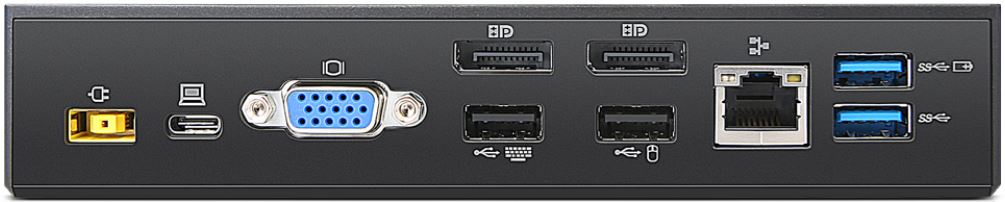
The following table has the video capability of USB-C dock is able to achieve. Actual video output on the dock is based on ThinkPad's system video performance as a result of the video signal from the ThinkPad system is passing through from system to the USB-C dock..
|
Display Configuration |
DisplayPort |
DisplayPort |
VGA |
|
One display |
3840x2160@30Hz |
||
|
1920*1200@60Hz |
|||
|
Two Displays |
1920*1080@60Hz |
1920*1080@60Hz |
|
|
1920*1080@60Hz |
1920*1080@60Hz |
||
|
|
1920*1080@60Hz |
1920*1080@60Hz |
| ThinkPad USB-C Dock Gen 2 (40AS) |
|---|


The following video resolutions are based on the ThinkPad system's video performance.
- ThinkPad DisplayPort 1.4 systems
- ThinkPad DisplayPort 1.2 systems
For more information on ThinkPad DisplayPort 1.4 and DisplayPort 1.2 systems, including compatibility, refer to the following:
Video Resolutions with ThinkPad DisplayPort 1.4/1.2 USB-C systems (AMD platform):
|
External Display |
DP1 |
DP2 |
HDMI |
Remark |
|
1 Display |
3840*2160@60Hz |
|
|
Supported by L14(20U5, 20U6),L15(20U7, 20U8) |
|
|
3840*2160@60Hz |
|
||
|
|
|
3840*2160@60Hz |
||
|
2 Displays |
3840*2160@60Hz |
3840*2160@30Hz |
|
|
|
3840*2160@30Hz |
3840*2160@60Hz |
|
||
|
|
3840*2160@60Hz |
3840*2160@30Hz |
||
|
|
3840*2160@30Hz |
3840*2160@60Hz |
||
|
3840*2160@60hz |
|
3840*2160@30Hz |
||
|
3840*2160@30Hz |
|
3840*2160@60Hz |
||
|
3 Displays (LCD off) |
3840*2160@30Hz |
3840*2160@30Hz |
3840*2160@30Hz |
| External Display | DP1 | DP2 | HDMI | Remark |
| 1 Display | 3840x2160@60Hz | Supported by T14s Gen1 (20UH,20UJ), T14 Gen1(20UD,20UE), P14s Gen 1(20Y1,20Y2), X13(20UF,20UG) | ||
| 3840x2160@60Hz | ||||
| 3840x2160@60Hz | ||||
| 2 Displays | 3840x2160@60Hz | 3840x2160@60Hz | ||
| 3840x2160@60Hz | 3840x2160@60Hz | |||
| 3840x2160@60Hz | 3840x2160@60Hz | |||
| 3 Displays | 3840x2160@60Hz | 3840x2160@60Hz | 3840x2160@30Hz | |
| 3840x2160@60Hz | 3840x2160@30Hz | 3840x2160@60Hz | ||
| (LCD off) | 3840x2160@30Hz | 3840x2160@60Hz | 3840x2160@60Hz |
| Display Configuration | DisplayPort 1 | DisplayPort 2 | HDMI | Remark |
| One Display | 3840x2160@60Hz | Supported byT495,T495s,X395,A485,A285 which support DisplayPort1.4. To achieve the resolution 1920x1080@60Hz for three displays at the same time, the bit depth settings of two displays should be 8-bit. |
||
| 3840x2160@60Hz | ||||
| 3840x2160@60Hz | ||||
| Two Displays | 3840x2160@30Hz or 2560x1440@60hz | 1920x1080@60Hz | ||
| 3840x2160@30Hz or 2560x1440@60hz | 1920x1080@60Hz | |||
| 1920x1080@60Hz | 3820x2160@30Hz | |||
| 1920x1080@60Hz | 3840x2160@30Hz or 2560x1440@60hz | |||
| 1920x1080@60Hz | 3840x2160@30Hz or 2560x1440@60hz | |||
| 2560x1440@60Hz | 1920x1080@60Hz | |||
| 2560x1440@60Hz | 1920x1080@60Hz | |||
| 1920x1080@60Hz | 2560x1440@60Hz | |||
| 1920x1080@60Hz | 2560x1440@60Hz | |||
| 1920x1080@60Hz | 2560x1440@60Hz | |||
| Three Displays | 1920x1080@60Hz | 1920x1080@60Hz | 1920x1080@60Hz |
Video Resolutions with ThinkPad DisplayPort 1.4 USB-C systems (Intel platform):
| Display Configuration | DisplayPort 1 | DisplayPort 2 | HDMI | Remark |
| One Display | 3840x2160@60Hz | Supported by P53, P73, P1 Gen2 which support DisplayPort1.4 | ||
| 3840x2160@60Hz | ||||
| 3840x2160@60Hz | ||||
| Two Displays | 3840x2160@30Hz or 2560x1440@60hz | 3840x2160@30Hz or 2560x1440@60hz | ||
| 3840x2160@30Hz or 2560x1440@60hz | 3840x2160@30Hz or 2560x1440@60hz | |||
| 3840x2160@30Hz or 2560x1440@60hz | 3840x2160@30Hz or 2560x1440@60hz | |||
| 2560x1600@60Hz | 2560x1600@60Hz | |||
| 2560x1600@60Hz | 2560x1600@60Hz | |||
| 2560x1600@60Hz | 2560x1600@60Hz | |||
| Three Displays | 1920x1080@ 60Hz | 1920x1080@ 60Hz | 1920x1080@ 60Hz |
Video Resolutions with ThinkPad DisplayPort 1.2 USB-C systems:
| Display Configuration | DisplayPort 1 | DisplayPort 2 | HDMI | Remark |
| 1 Display | 3840x2160@30Hz or 2560x1440@60hz | All ThinkPad systems listed in support scope | ||
| 3840x2160@30Hz or 2560x1440@60hz | ||||
| 3840x2160@30Hz or 2560x1440@60hz | ||||
| 2 Displays | 1920x1080@60Hz | 1920x1080@60Hz | ||
| 1920x1080@60Hz | 1920x1080@60Hz | |||
| 1920x1080@60Hz | 1920x1080@60Hz | |||
| 3 Displays(LCD off) | 1024x768@60Hz | 1024x768@60Hz | 1024x768@60Hz |
| ThinkPad Workstation Dock (40A5) |
|---|


| ThinkPad Video Output | Docking Video Output | Maximum displays simultaneously supported (system + docking) | ||||||||
| System | Graphics Mode | Integrated ThinkPad Display | Mini DisplayPort out | Thunderbolt 1 | Thunderbolt 2 | HDMI | DisplayPort or HDMI | DisplayPort or DVI | VGA | |
| ThinkPad P50 | Hybrid | x | x (selectable while docked) | x | Not applicable | x | x | x | x | 5 - any combination |
| Discrete | x | x (selectable while docked) | x | Not applicable | x | x | x | x | 4 - any combination | |
| ThinkPad P70 | Hybrid | x | x Cannot be used while dock has monitor | x | x | x | x | x | x | 5 - any combination |
| Discrete | x | x Cannot be used while dock has monitor | x | x | x | x | x | x | 4 - any combination | |
Maximum Resolution/ Refresh Rate Support
The following matrix shows the video capability of Workstation dock is
able to achieve. Actual video output on the dock is based on system
video performance since the video signal is passing through from system
to the Workstation dock.
| Display Configuration | Bank 1 DisplayPort -1 |
Bank 1 HDMI |
Bank 2 DisplayPort -2 |
Bank 2 DVI -D |
Bank 3 VGA |
|---|---|---|---|---|---|
| One Display | 3840 x 2160 @60Hz | ||||
| 3840 x 2160 @30Hz | |||||
| 3840 x 2160 @60Hz | |||||
| 1920 x 1200 @60Hz | |||||
| 1920 x 1200 @60Hz | |||||
| Two Displays | 3840 x 2160 @30Hz | 3840 x 2160 @30Hz | |||
| 3840 x 2160 @60Hz | 1920 x 1200 @60Hz | ||||
| 3840 x 2160 @60Hz | 1920 x 1200 @60Hz | ||||
| 3840 x 2160 @30Hz | 3840 x 2160 @30Hz | ||||
| 3840 x 2160 @30Hz | 1920 x 1200 @60Hz | ||||
| 3840 x 2160 @30Hz | 1920 x 1200 @60Hz | ||||
| 3840 x 2160 @60Hz | 1920 x 1200 @60Hz | ||||
| 1920 x 1200 @60Hz | 1920 x 1200 @60Hz | ||||
| 3 Displays | 3840 x 2160 @30Hz | 3840 x 2160 @30Hz | 1024 x 768 @60Hz | ||
| 1920 x 1200 @60Hz | 1920 x 1200 @60Hz | 1920 x 1200 @60Hz | |||
| 3840 x 2160 @30Hz | 3840 x 2160 @30Hz | 1024 x 768 @60Hz | |||
| 1920 x 1200 @60Hz | 1920 x 1200 @60Hz | 1920 x 1200 @60Hz |
| ThinkPad OneLink+ Dock (40A4) |
|---|


4k2k Display Capability: ThinkPad Yoga 260 docked with ThinkPad OneLink+ Dock
The following table has the video outputs with maximum resolution on ThinkPad Yoga 260 docked with ThinkPad OneLink+ Dock
| Display Configuration | Integrated ThinkPad Display | DisplayPort 1 | DisplayPort 2 | VGA |
| Single Display | Depends on system | - | - | - |
| - | 3840x2160@30Hz | - | - | |
| - | - | 3840x2160@30Hz | - | |
| - | - | - | 1920x1080@60Hz | |
| Two Display | ON | 3840x2160@30Hz | - | - |
| ON | - | 3840x2160@30Hz | - | |
| ON | - | - | 1920x1080@60Hz | |
| - | 2560x1600@60Hz | 2560x1600@60Hz | - | |
| - | - | 2560x1600@60Hz | 1920x1080@60Hz | |
| - | 2560x1600@60Hz | - | 1920x1080@60Hz | |
| Three Display | ON | 2560x1600@60Hz | 2560x1600@60Hz | - |
| ON | - | 2560x1600@60Hz | 1920x1080@60Hz | |
| ON | 2560x1600@60Hz | - | 1920x1080@60Hz | |
| - | 2560x1600@60Hz | 1920x1080@60Hz | 1920x1080@60Hz |
Notice: When a 4K monitor is attached, regardless of the resolution that is configured, the display capability is limited to single external monitor output. It`s not supported to attach a second monitor.
Maximum Resolution / Refresh Rate Support
The following table has the video capability of OneLink+ dock is able to achieve. Actual video output on the dock is based on ThinkPad system's video performance. As a result of the ThinkPad's video signal is passing through from system to the OneLink+ dock.
| Display Configuration | DisplayPort | DisplayPort | VGA |
|---|---|---|---|
| One Display | 3840x2160@60Hz | - | - |
| - | - | 1920*1200@60Hz | |
| Two Displays | 3840x2160@60Hz | 1024*768@60Hz | - |
| 3840x2160@30Hz | 3840x2160@30Hz | - | |
| 3840x2160@60Hz | - | 1024*768@60Hz | |
| 3840x2160@30Hz | - | 1920*1200@60Hz | |
| Three Displays | 3840x2160@30Hz | 3840x2160@30Hz | 1024*768@60Hz |
| 1920*1200@60Hz | 1920*1200@60Hz | 1920*1200@60Hz |
PXE (Preboot Execution Environment) Boot Support
ThinkPad OneLink+ dock allows to PXE boot your ThinkPad OneLink+ system via a network. Please ensure your system BIOS and OneLink+ dock driver are the latest version, or upgrade them to the latest by System Update.
| ThinkPad Basic Dock 65W (40A0), ThinkPad Basic Dock 90W (40A0) |
|---|


| System |
Graphics Card
|
ThinkPad Video Output
|
Docking Video Output
|
Maximum displays simultaneously supported (system + docking)
|
||
|
ThinkPad LCD
|
VGA
|
DisplayPort |
VGA
|
|||
|
ThinkPad X240s
|
Intel
|
x
|
x
|
x
|
no docking support
|
3 - any combination
|
|
ThinkPad X240
|
Intel
|
x
|
x
Cannot be used while docked |
x
|
x
|
|
|
ThinkPad T440s
|
Intel
|
x
|
x
Cannot be used while docked |
x
|
x
|
|
|
SWG Model
|
x
|
x
|
x
|
no docking support
|
||
|
ThinkPad T440
|
Intel
|
x
|
x
Cannot be used while docked |
x
|
x
|
|
|
SWG Model
|
x
|
x
|
x
|
no docking support
|
||
|
ThinkPad T440p
|
Intel
|
x
|
x
|
x
|
x
|
|
|
SWG Model
|
x
|
x
|
x
|
x
|
||
|
ThinkPad T540p
|
Intel
|
x
|
x
|
x
|
x
|
|
|
SWG Model
|
x
|
x
|
x
|
x
|
||
|
ThinkPad L440
|
Intel
|
x
|
x
|
x
|
x
|
|
|
SWG Model
|
x
|
x
|
x
|
no docking support
|
||
|
ThinkPad L540
|
Intel
|
x
|
x
|
x
|
x
|
|
|
ThinkPad W540
|
Standard Mode
|
x
|
x
|
x
|
x
|
|
|
Advanced Mode
|
x
|
x
|
x
|
x
|
4 - any combination
|
|
|
ThinkPad X250
|
Intel
|
x
|
x
Cannot be used while docked |
x
|
x
|
3 - any combination
|
|
ThinkPad T450s
|
Intel
|
x
|
x
Cannot be used while docked |
x
|
x
|
|
|
SWG Model
|
x
|
x
|
x
|
no docking support
|
||
|
ThinkPad T450
|
Intel
|
x
|
x
Cannot be used while docked |
x
|
x
|
|
|
SWG Model
|
x
|
x
|
x
|
no docking support
|
||
|
ThinkPad T550
|
Intel
|
x
|
x
Cannot be used while docked |
x
|
x
|
|
|
SWG Model
|
x
|
x
|
x
|
|||
|
ThinkPad L450
|
Intel
|
x
|
x
|
x
|
x
|
|
|
SWG Model
|
x
|
x
|
x
|
no docking support
|
||
|
ThinkPad W550s
|
SWG Model
|
x
|
x
Cannot be used while docked |
x
|
x
|
|
Note:
- For X240, T440s, T440, X250, T450s, T450, T550, and W550s Intel Graphics both System VGA and Display output of Docking station can't be used at the same time. When Docking station is used, system has to be attached/detached to Docking station after removing VGA cable from system VGA connector.
- SWG Model means the system has both Intel integrated graphics and discrete graphics inside.
| System | Graphics Card | ThinkPad Video Output | Docking Video Output | Maximum displays simultaneously supported (system + docking) | |||||
| ThinkPad LCD | VGA out | HDMI | DisplayPort | DisplayPort or HDMI | DisplayPort or DVI | VGA | |||
| ThinkPad X260 | Intel | x | - | Cannot be used while docked | x | x | x | x | 3 - any combination |
| ThinkPad T460s | Intel/SWG | x | - | Cannot be used while docked | x | x | x | x | |
| ThinkPad T460 | Intel/SWG | x | - | Cannot be used while docked | x | x | x | x | |
| ThinkPad T460p | Intel/SWG | x | - | x | x | x | x | x | |
| ThinkPad T560 | Intel/SWG | x | - | Cannot be used while docked | x | x | x | x | |
| ThinkPad L460 | Intel | x | x | - | x | x | x | x | |
| SWG Model | x | x | - | x | no dock support | ||||
| ThinkPad L560 | Intel | x | Cannot be used while docked | - | x | x | x | x | |
| ThinkPad P50s | Intel/SWG | x | - | Cannot be used while docked | x | x | x | x | |
Note:
- For system with Intel Graphics, VGA / HDMI on system and VGA on dock cannot output at the same time. When Docking station is used, system has to be attached/detached to Docking station after removing VGA cable from system VGA connector.
- SWG Model: ThinkPad system has both Intel integrated graphics and discrete graphics.
Maximum Resolution/ Refresh Rate Support
The following matrix shows the video capability of ThinkPad Basic dock
is able to achieve. Actual video output on the dock is based on system
video performance since the video signal is passing through from system
to the Basic dock.
| VGA | |
| 1 Display | 1920 x 1200 @60Hz |
| ThinkPad Pro Dock (40A1) |
|---|


| System |
Graphics Card
|
ThinkPad Video Output
|
Docking Video Output
|
Maximum displays simultaneously supported (system + docking)
|
|||
|
ThinkPad LCD
|
VGA out
|
DisplayPort |
DisplayPort or DVI
|
VGA
|
|||
|
ThinkPad X240s
|
Intel
|
x
|
x
|
x
|
no docking support
|
3 - any combination
|
|
|
ThinkPad X240
|
Intel
|
x
|
x
Cannot be used while docked |
x
|
x
|
x
|
|
|
ThinkPad T440s
|
Intel
|
x
|
x
Cannot be used while docked |
x
|
x
|
x
|
|
|
SWG Model
|
x
|
x
|
x
|
no docking support
|
|||
|
ThinkPad T440
|
Intel
|
x
|
x
Cannot be used while docked |
x
|
x
|
x
|
|
|
SWG Model
|
x
|
x
|
x
|
no docking support
|
|||
|
ThinkPad T440p
|
Intel
|
x
|
x
|
x
|
x
|
x
|
|
|
SWG Model
|
x
|
x
|
x
|
x
|
x
|
||
|
ThinkPad T540p
|
Intel
|
x
|
x
|
x
|
x
|
x
|
|
|
SWG Model
|
x
|
x
|
x
|
x
|
x
|
||
|
ThinkPad L440
|
Intel
|
x
|
x
|
x
|
x
|
x
|
|
|
SWG Model
|
x
|
x
|
x
|
no docking support
|
|||
|
ThinkPad L540
|
Intel
|
x
|
x
|
x
|
x
|
x
|
|
|
ThinkPad W540
|
Standard Mode
|
x
|
x
|
x
|
x
|
x
|
|
|
Advanced Mode
|
x
|
x
|
x
|
x
|
x
|
5 - any combination
|
|
|
ThinkPad X250
|
Intel
|
x
|
x
Cannot be used while docked |
x
|
x
|
x
|
3 - any combination
|
|
ThinkPad T450s
|
Intel
|
x
|
x
Cannot be used while docked |
x
|
x
|
x
|
|
|
SWG Model
|
x
|
x
|
x
|
no docking support
|
|||
|
ThinkPad T450
|
Intel
|
x
|
x
Cannot be used while docked |
x
|
x
|
x
|
|
|
SWG Model
|
x
|
x
|
x
|
no docking support
|
|||
|
ThinkPad T550
|
Intel
|
x
|
x
Cannot be used while docked |
x
|
x
|
x
|
|
|
SWG Model
|
x
|
x
|
x
|
x
|
|||
|
ThinkPad L450
|
Intel
|
x
|
x
|
x
|
x
|
x
|
|
|
SWG Model
|
x
|
x
|
x
|
no docking support
|
|||
|
ThinkPad W550s
|
SWG Model
|
x
|
x
Cannot be used while docked |
x
|
x
|
x
|
|
Note:
- For X240, T440s, T440, X250, T450s, T450, T550, and W550s Intel Graphics both System VGA and Display output of Docking station can't be used at the same time. When Docking station is used, system has to be attached/detached to Docking station after removing VGA cable from system VGA connector.
- SWG Model means the system has both Intel integrated graphics and discrete graphics inside.
| System | Graphics Card | ThinkPad Video Output | Docking Video Output | Maximum displays simultaneously supported (system + docking) | ||||
| ThinkPad LCD | VGA out | HDMI out | DisplayPort | DisplayPort or DVI | VGA | |||
| ThinkPad X260 | Intel | x | - | Cannot be used while docked | x | x | x | 3 - any combination |
| ThinkPad T460s | Intel/SWG | x | - | Cannot be used while docked | x | x | x | |
| ThinkPad T460 | Intel/SWG | x | - | Cannot be used while docked | x | x | x | |
| ThinkPad T460p | Intel/SWG | x | - | x | x | x | x | |
| ThinkPad T560 | Intel/SWG | x | - | Cannot be used while docked | x | x | x | |
| ThinkPad L460 | Intel | x | x | - | x | x | x | |
| SWG Model | x | x | - | x | no docking support | |||
| ThinkPad L560 | Intel | x | Cannot be used while docked | - | x | x | x | |
| ThinkPad P50s | Intel/SWG | x | - | Cannot be used while docked | x | x | x | |
Note:
- For system with Intel Graphics, VGA / HDMI on system and VGA on dock cannot output at the same time. When Docking station is used, system has to be attached/detached to Docking station after removing VGA cable from system VGA connector.
- SWG Model means the system has both Intel integrated graphics and discrete graphics inside. .
Maximum Resolution/ Refresh Rate Support
The following matrix shows the video capability of ThinkPad Pro dock is
able to achieve. Actual video output on the dock is based on system
video performance since the video signal is passing through from system
to the Pro dock.
| Bank 1 DisplayPort |
Bank 1 DVI-D |
Bank 2 VGA |
|
| 1 Display | 3840 x 2160 @60Hz | ||
| 1920 x 1200 @60Hz | |||
| 1920 x 1200 @60Hz | |||
| 2 Displays | 3840 x 2160 @60Hz | 1920 x 1200 @60Hz | |
| 1920 x 1200 @60Hz | 1920 x 1200 @60Hz |
| ThinkPad Ultra Dock 90W (40A2) or ThinkPad Ultra Dock 135W, 170W (40A2) |
|---|


|
Product
|
Graphics Card
|
ThinkPad Video Output
|
Docking Video Output
|
Maximum displays simultaneously supported (system + docking)
|
||||
|
ThinkPad LCD
|
VGA out
|
DisplayPort |
DisplayPort or HDMI
|
DisplayPort or DVI
|
VGA
|
|||
|
ThinkPad X240s
|
Intel
|
x
|
x
|
x
|
no docking support
|
3 - any combination
|
||
|
ThinkPad X240
|
Intel
|
x
|
x
Cannot be used while docked |
x
|
x
|
x
|
x
|
|
|
ThinkPad T440s
|
Intel
|
x
|
x
Cannot be used while docked |
x
|
x
|
x
|
x
|
|
|
SWG Model
|
x
|
x
|
x
|
no docking support
|
||||
|
ThinkPad T440
|
Intel
|
x
|
x
Cannot be used while docked |
x
|
x
|
x
|
x
|
|
|
SWG Model
|
x
|
x
|
x
|
no docking support
|
||||
|
ThinkPad T440p
|
Intel
|
x
|
x
|
x
|
x
|
x
|
x
|
|
|
SWG Model
|
x
|
x
|
x
|
x
|
x
|
x
|
||
|
ThinkPad T540p
|
Intel
|
x
|
x
|
x
|
x
|
x
|
x
|
|
|
SWG Model
|
x
|
x
|
x
|
x
|
x
|
x
|
||
|
ThinkPad L440
|
Intel
|
x
|
x
|
x
|
x
|
x
|
x
|
|
|
SWG Model
|
x
|
x
|
x
|
no docking support
|
||||
|
ThinkPad L540
|
Intel
|
x
|
x
|
x
|
x
|
x
|
x
|
|
|
ThinkPad W540
|
Standard Mode
|
x
|
x
|
x
|
x
|
x
|
x
|
|
|
Advanced Mode
|
x
|
x
|
x
|
x
|
x
|
x
|
6 - any combination
|
|
|
ThinkPad X250
|
Intel
|
x
|
x
Cannot be used while docked |
x
|
x
|
x
|
x
|
3 - any combination
|
|
ThinkPad T450s
|
Intel
|
x
|
x
Cannot be used while docked |
x
|
x
|
x
|
x
|
|
|
SWG Model
|
x
|
x
|
x
|
no docking support
|
||||
|
ThinkPad T450
|
Intel
|
x
|
x
Cannot be used while docked |
x
|
x
|
x
|
x
|
|
|
SWG Model
|
x
|
x
|
x
|
no docking support
|
||||
|
ThinkPad T550
|
Intel
|
x
|
x
Cannot be used while docked |
x
|
x
|
x
|
x
|
|
|
SWG Model
|
x
|
x
|
x
|
x
|
x
|
|||
|
ThinkPad L450
|
Intel
|
x
|
x
|
x
|
x
|
x
|
x
|
|
|
SWG Model
|
x
|
x
|
x
|
no docking support
|
||||
|
ThinkPad W550s
|
SWG Model
|
x
|
x
Cannot be used while docked |
x
|
x
|
x
|
x
|
|
Note:
- For X240, T440s, T440, X250, T450s, T450, T550, and W550s Intel Graphics both System VGA and Display output of Docking station can't be used at the same time. When Docking station is used, system has to be attached/detached to Docking station after removing VGA cable from system VGA connector.
- SWG Model means the system has both Intel integrated graphics and discrete graphics inside.
| System | Graphics Card | ThinkPad Video Output | Docking Video Output | Maximum displays simultaneously supported (system + docking) | |||||
| ThinkPad LCD | VGA out | HDMI | DisplayPort | DisplayPort or HDMI | DisplayPort or DVI | VGA | |||
| ThinkPad X260 | Intel | x | - | Cannot be used while docked | x | x | x | x | 3 - any combination |
| ThinkPad T460s | Intel/SWG | x | - | Cannot be used while docked | x | x | x | x | |
| ThinkPad T460 | Intel/SWG | x | - | Cannot be used while docked | x | x | x | x | |
| ThinkPad T460p | Intel/SWG | x | - | x | x | x | x | x | |
| ThinkPad T560 | Intel/SWG | x | - | Cannot be used while docked | x | x | x | x | |
| ThinkPad L460 | Intel | x | x | - | x | x | x | x | |
| SWG Model | x | x | - | x | no dock support | ||||
| ThinkPad L560 | Intel | x | Cannot be used while docked | - | x | x | x | x | |
| ThinkPad P50s | Intel/SWG | x | - | Cannot be used while docked | x | x | x | x | |
Note:
- For system with Intel Graphics, VGA / HDMI on system and VGA on dock cannot output at the same time. When Docking station is used, system has to be attached/detached to Docking station after removing VGA cable from system VGA connector.
- SWG Model means the system has both Intel integrated graphics and discrete graphics inside. .
Maximum Resolution/ Refresh Rate Support
The following matrix shows the video capability of ThinkPad Ultra dock
is able to achieve. Actual video output on the dock is based on system
video performance since the video signal is passing through from system
to the Ultra dock.
| Display Configuration | Bank 1 DisplayPort -1 |
Bank 1 HDMI |
Bank 2 DisplayPort -2 |
Bank 2 DVI-D |
Bank 3 VGA |
| One Display | 3840 x 2160 @60Hz | ||||
| 3840 x 2160 @30Hz | |||||
| 3840 x 2160 @60Hz | |||||
| 1920 x 1200 @60Hz | |||||
| 1920 x 1200 @60Hz | |||||
| Two Displays | 3840 x 2160 @30Hz | 3840 x 2160 @30Hz | |||
| 3840 x 2160 @60Hz | 1920 x 1200 @60Hz | ||||
| 3840 x 2160 @60Hz | 1920 x 1200 @60Hz | ||||
| 3840 x 2160 @30Hz | 3840 x 2160 @30Hz | ||||
| 3840 x 2160 @30Hz | 1920 x 1200 @60Hz | ||||
| 3840 x 2160 @30Hz | 1920 x 1200 @60Hz | ||||
| 3840 x 2160 @60Hz | 1920 x 1200 @60Hz | ||||
| 1920 x 1200 @60Hz | 1920 x 1200 @60Hz | ||||
| Three Displays | 3840 x 2160 @30Hz | 3840 x 2160 @30Hz | 1024 x 768 @60Hz | ||
| 1920 x 1200 @60Hz | 1920 x 1200 @60Hz | 1920 x 1200 @60Hz | |||
| 3840 x 2160 @30Hz | 3840 x 2160 @30Hz | 1024 x 768 @60Hz | |||
| 1920 x 1200 @60Hz | 1920 x 1200 @60Hz | 1920 x 1200 @60Hz |
| Lenovo USB3.0 to DVI/VGA adapter (0B47072) and Lenovo Universal USB 3.0 to VGA/HDMI Adapter (4X90H20061) on ThinkPad Docks to support multiple monitors |
|---|
| ThinkPad Dock | Maximum number of External Monitors | |
| without USB3.0 to DVI/VG Adapter (0B47072) or Universal USB3.0 to VGA/HDMI Adapter (4X90H20061) | with USB3.0 to DVI/VG Adapter (0B47072) or Universal USB3.0 to VGA/HDMI Adapter (4X90H20061) | |
| ThinkPad USB3.0 Pro Dock | Two | Six |
| ThinkPad USB3.0 Ultra Dock | Two | Six |
| ThinkPad USB3.0 Dock | Two | Six |
| ThinkPad Basic USB3.0 Dock | One | Six |
| ThinkPad Onelink Dock | One | Seven |
| ThinkPad Onelink Pro Dock | Two | Eight |
Note: Does not include the ThinkPad integrated display. For example: The ThinkPad USB3.0 dock, has two video ports (DVI x 2), and then attach four USB3.0 to DVI adapters to any of the four USB3.0 ports on either dock or system. As a result, there are six external monitors.
| Lenovo USB-C Mini Dock (40AU) |
|---|


The following video resolutions are based on the ThinkPad system's video performance.
- ThinkPad DisplayPort 1.4 systems
- ThinkPad DisplayPort 1.2 systems
For more information on ThinkPad DisplayPort 1.4 and DisplayPort 1.2 systems, including compatibility, refer to the following:
| Video Resolutions with ThinkPad DisplayPort 1.4 USB-C systems : | |||
| External Display | VGA | HDMI | Remark |
| one Display | 1920*1080@60Hz | 3840*2160@60Hz | Only support one monitor simultaneously. |
| Video Resolutions with ThinkPad DisplayPort 1.2 USB-C systems : | |||
| External Display | VGA | HDMI | Remark |
| one Display | 1920*1080@60Hz | 3840*2160@30Hz | Only support one monitor simultaneously. |
Related Articles
- Docks, Port Replicator, Ultrabase - Reference Guide
- System compatibility information for docks:
- Lenovo Smart Find
- Docks Finder - Find a compatible docking station for your Lenovo laptop.
- Accessories Compatibility Guide
- Monitors - Reference Guide
- Monitor Accessories - Reference Guide - Includes monitor cables: DisplayPort, HDMI, VGA, DVI
- Personal Systems Reference (PSREF) - Features and technical specifications of Lenovo products
help
Get help from Product Home page
Find more solutions, tools and helpful information from our Product Home page.
Contact Us
Save time by starting your support request online
